There is no doubt that progressive web apps (PWAs) are the modern equivalent of great, seamless experiences both online and on mobile devices. In a nutshell, a PWA development on a website is a steroids that adds all the features of a website to a local application without having to sacrifice accessibility or flexibility in order to achieve that.
As the name implies, the primary function of this app is to make sending push notifications as easy as possible. There is, however, an important question that everyone wishes to know, which is why push notifications are so revolutionary.
Take a moment to imagine a scenario in your head, for example. As a business owner, you want to make sure that your alerts remain active in order for your clients to remain in touch with you. Even when your users are not within your website, you still have the opportunity to interact with them.
What are the Steps for Adding Push Notifications to PWAs?
The first step is to launch a push notification service. The purpose of this stage is to facilitate the connection between the user’s device and the server. There are a variety of push notification providers, such as Firebase Cloud Messaging (FCM), which is popular because it is robust and easy to use.
The second step is to begin the process for a PWA development. It is essential that you include a service worker in your project. As well as handling push notifications, this service worker runs a background script that may disconnect from your website.
It is important to note that all of these processes can occur even when the website isn’t open. Specifically, it controls workflow and ensures that notices are seen and received by the user.
Once Worker is configured, you must obtain the user’s consent before sending any notifications. Taking this step is necessary. It is possible for some users to refuse to receive alerts. By signing up for push notifications, the server has been provided with an endpoint URL that it can use to transmit messages.
How do PWA Push Notifications work?
For Progressive Web Apps (PWA) to get direct connections, push notifications are required. Users’ devices can be updated directly by sending them updates on time.
Follow these instructions to use this feature:
Important Actions:
- It’s important to set up a push notification service (like FCM or OneSignal).
- Get the user’s permission before sending alerts.
- The push notification service requires users to sign up.
- Inbound alerts can be handled by the service worker.
- Create push alerts using subscription endpoints on the server.
What are the Steps to Sign Up for Push Notifications?
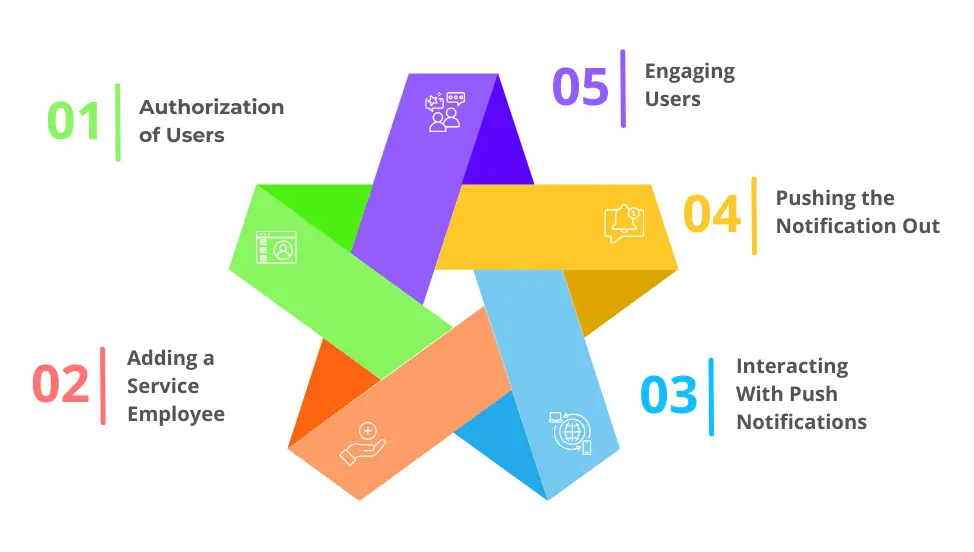
1. Authorization of Users
You’ll see a popup asking for permission to deliver alerts when you visit a progressive web application (PWA). The procedure can’t proceed until the user consents.
2. Adding a Service Employee
All of the alerts will be handled by a service worker, a background script that can also handle data synchronization. Activate push notifications by registering first.
3. Interacting With Push Notifications
In order for PWAs to deliver push notifications effectively, they need to communicate with push notification providers. All the information a user needs to sign up is sent through the PWA development.
4. Pushing the Notification Out
A push notification registering a service worker was sent to the push notification service. Employees show notifications to users after deliveries are made.
5. Engaging Users
It’s possible to monitor and analyze how users interact with the alerts. Ensure interactions and relevant notifications through an optimized notification approach.
What's the Difference Between App and Web Push Notifications?
Users get push alerts to let them know about specials, messages and changes. Customers will be able to access a feature on websites and mobile apps. Nevertheless, you might wonder how push notifications differ from app notifications.
The majority of websites, however, send out online push notifications. These messages don’t require users to install the program, unlike app notifications.Most of the time, progressive web apps (PWAs) are used for websites that provide an app-like experience.
To understand the key differences between push notifications on websites and apps, follow these steps:
1. Prerequisites for Installation
- Web Push Notifications: You can use them without installing any apps and they’re quite easy to use. It is the user’s responsibility to grant the website permission to send them alerts.
- App Push Notifications: The app must be downloaded and installed in order to receive push notifications.
2. Reliance on Platforms
- Web Push Notifications: Web push notifications are always available across a variety of platforms, including desktop and mobile browsers, thanks to PWA development.
- Push notifications for apps: Apple and Android are the only operating systems that support them.
3. Involvement of Users
- Web Push Notifications: Since app users are not blocked from receiving the notice, the notice reaches a larger audience. The browser initiates a direct connection between the user and the server.
- Push notifications for apps: Apps that receive push notifications are more likely to be of interest to users who have already downloaded the app and shown interest in it.
4. Complexity of Implementation
- Web Push messages:
- The development of progressive web applications makes it easier to include these messages. Utilizing widely available, reasonably priced technology, they serve a wide audience.
- Push Notifications for Apps: Require integration with platform-specific push notification providers, making app development difficult.
Conclusion
Push notifications are an excellent way to provide a seamless user experience in Progressive Web Apps (PWAs). Providing reliable solutions for seamlessly integrating web push notifications into progressive web applications, Eiy sys is a pioneer in this space.
By using PWA development knowledge, organizations can ensure that they stay in touch with their consumers and deliver interesting content and timely updates to their devices.
Your message will reach the targeted audience at the appropriate time thanks to Eiy sys’s dependability and prompt push notifications. PWAs are created using a methodology that increases user engagement and retention, making them essential in digital marketing.
Frequently Asked Questions
PWAs are web applications that provide an experience similar to native apps using modern web technologies. The application combines the best features of web and mobile apps, including offline access, push notifications and a home screen icon.
A PWA can be installed on a user's home screen and provides offline functionality, which isn't available in traditional web apps. Similar to native apps, they provide a more engaging and seamless user experience.
It is possible to install PWAs on both Android and iOS devices. Android users can add the app to their home screen from the browser. Safari supports installation through the "Add to Home Screen" option.
The majority of modern browsers support PWAs, such as Chrome, Firefox, Edge and Safari. It is, however, possible for different browsers to support different features in the same way.