



Rankings rarely fall off a cliff. They slip a position at a time over several months, traffic softens, and by the time somebody notices, the cause is months behind the symptom. An SEO audit exists to find that cause, not to produce a list of everything technically imperfect about a website.
The difference matters. A crawler will happily hand you four hundred issues, most of which affect nothing. A useful audit separates the handful that are actually costing you visibility from the noise, and tells you which order to fix them in.
SEO audit checklist: Why Rankings Slip Without Anything Obviously Breaking
Nothing has to break for performance to decline. A competitor publishes better content on a page you used to own. A CMS update quietly adds a noindex tag to a template. Google reassesses what a query means and your page no longer matches the new interpretation.
None of that shows up as an error. The site loads, the pages exist, analytics still reports traffic. What changed sits below the surface, which is why periodic auditing beats waiting for something visible to go wrong. Teams running structured SEO services usually audit on a schedule for exactly this reason.
The other reason to audit is compounding. A crawl budget wasted on thin pages, a slow template, and a broken internal link structure each cost a little. Together they set a ceiling on what the good content on your site can achieve.
How Do You Run an SEO Audit That Actually Finds Problems?
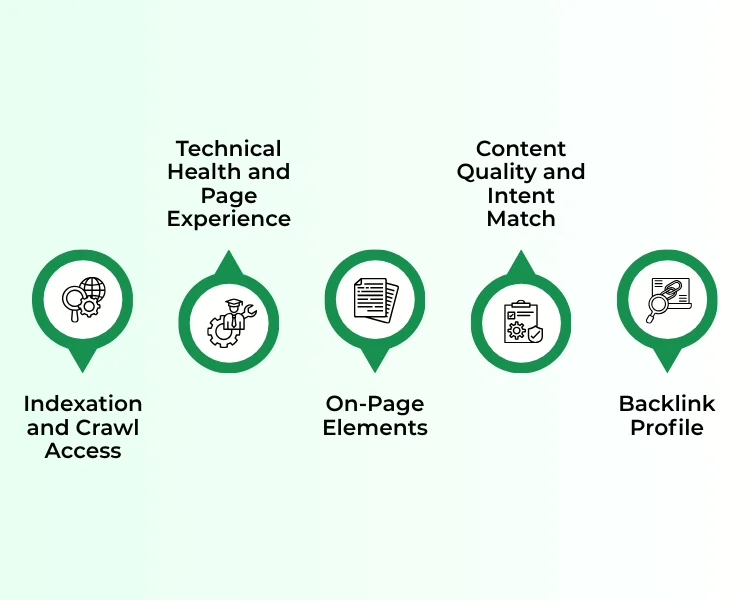
Work through these five areas in order. The sequence matters, because a page that cannot be crawled will not benefit from anything you do to its content.
1. Indexation and Crawl Access
Start with whether Google can reach and store your pages at all. Check Search Console coverage for excluded URLs, then verify robots.txt, canonical tags, and noindex directives. A single stray noindex on a template can remove an entire section from search, and it will not appear as an error anywhere else.
2. Technical Health and Page Experience
Measure Core Web Vitals against real field data rather than lab scores. Look at server response time, render-blocking resources, and mobile layout stability. Slow pages rarely lose rankings outright, but they suppress engagement, and suppressed engagement shows up in performance over time.
3. On-Page Elements
Check title tags, meta descriptions, heading hierarchy, and internal links page by page. Missing or duplicated titles are the most common finding in any website page audit, and among the cheapest to correct. Confirm each page targets one clear query rather than competing with its neighbors.
4. Content Quality and Intent Match
Compare each important page against what currently ranks for its target query. If the top results answer a different question than your page does, the problem is intent rather than optimization. Thin pages that serve no query should be consolidated or removed rather than rewritten.
5. Backlink Profile
Review referring domains for relevance and quality, and identify pages earning links that no longer exist or now redirect. Reclaiming a handful of broken inbound links is usually faster than earning new ones.
Why Do Most Pages Never Rank at All?
Because most pages were never going to. This is the part of auditing that teams find uncomfortable, since it means some findings are not fixable through optimization.
Ahrefs studied their Content Explorer index of roughly 14 billion pages and found that 96.55% of them get zero traffic from Google, with a further 1.94% receiving between one and ten monthly visits. Worth noting Ahrefs’ own caveat: their sample skews toward the higher-quality end of the web, so the real figure across the whole internet is likely worse rather than better.
The three causes behind that number are consistent. Nobody searches for the topic, so ranking first would still deliver nothing. The page has no links and no authority behind it. Or the page is not indexed and therefore cannot appear at all. An audit that surfaces these early saves you optimizing pages that have no path to traffic, which is the kind of repetitive review work that automation handles better than people do.
Which Audit Findings Should You Fix First?
A finished audit typically lists more work than any team can absorb at once. Sorting by impact rather than by severity label is what turns a report into results.
Fix Immediately
• Anything blocking indexation, since an unindexed page earns nothing regardless of its quality.
• Missing or duplicated title tags on pages that already receive impressions.
• Broken internal links and redirect chains on your highest-traffic templates.
Schedule for Later
• Image compression and lazy loading, which help but rarely change rankings alone.
• Schema markup on pages that are already ranking acceptably.
• Cosmetic heading hierarchy issues that do not affect how a page reads.
Is Your Site Ready for a Full Technical SEO Audit?
Readiness is mostly about access. Without Search Console, analytics history, and permission to change templates, an audit produces recommendations nobody can act on. Sites where the development team and the search team work from the same list tend to close findings far faster, which is also true of broader digital marketing work where technical fixes and content changes have to land together.
• Confirm Data Access First- Search Console, analytics, and server logs if available. An audit without Search Console coverage data is guesswork.
• Fix the Crawl Before the Content- Indexation problems invalidate every other finding, so resolve them before touching page copy.
• Set a Baseline You Can Measure- Record impressions, average position, and click-through rate per template before changes begin.
• Work Template by Template- Fixing one product page helps one page. Fixing the template helps every page using it.
• Separate Symptoms From Causes- A ranking drop is a symptom. The cause is usually indexation, intent mismatch, or a competitor improving.
• Re-Audit After Sixty Days- Search Console data lags, so measuring too early tells you nothing useful about whether the fix worked.
Conclusion
An SEO audit is only as valuable as the decisions it produces. A four-hundred-item report that nobody prioritizes changes nothing, while five correctly ordered fixes on the right templates can recover months of lost visibility. The skill is in the sorting, not the crawling.
EIY SYS works with businesses on exactly that: auditing what is actually holding a site back, then handling the technical and content work to fix it. If your rankings have been drifting and nobody can say why, get in touch and we will start with the data rather than a guess.
Frequently Asked Questions
A full audit once or twice a year suits most sites, with a lighter monthly check on indexation and Core Web Vitals. Run an additional audit after any site migration, redesign, or CMS change, since those are when technical problems are most often introduced.
A technical SEO audit covers crawling, indexation, site speed, and structure only. A full SEO audit includes all of that plus content quality, intent matching, on-page elements, and the backlink profile.
A focused audit of a small site takes a few days, while a large ecommerce site with thousands of URLs can take several weeks. The crawling is fast; the analysis and prioritization are what consume the time.
It can when the cause is fixable, such as an indexation error, a slow template, or an internal linking problem. It cannot recover rankings lost because a competitor simply published something better, since that requires new content rather than a fix.
Findings grouped by area, each with the affected URLs, the likely impact, and the effort required to fix. A report that lists issues without prioritizing them leaves the hardest decision with the reader.

Jasleen Kaur
Hi, I’m Jasleen, a content writer and SEO enthusiast who loves turning ideas into engaging, reader-friendly content. I create blog posts, articles, and web copy that not only inform but also help websites rank higher on search engines. Combining st...read more