Cloud application security refers to the set of policies, processes, and controls designed to minimize the risk of exposing cloud-based applications to potential threats or failures, whether from external or internal sources.It includes practices like authentication, access control, data encryption, identity management, and vulnerability management. It covers secure development methods, monitoring, logging for security, compliance with regulations, and incident response planning.By following these practices, organizations can enforce secure coding practices, monitor and log activities for quick detection and response, comply with necessary regulations, and be prepared for security incidents.
For many businesses, applications are hosted in hybrid cloud environments, which combine public cloud, private cloud, and on-premises resources. Cloud application security is a shared responsibility between the cloud service provider and the organization. For instance, if the application is hosted in a public cloud (like AWS, Azure, or Google Cloud), the provider manages the infrastructure security, while the organization is responsible for securing the application and its configurations.
If the organization manages its own servers, whether on-premises or in a private cloud, it is responsible for securing not just the application but also the operating system, network infrastructure, and physical hardware.
What Are The Best Practices For Cloud Security?
1. Understand Shared Responsibility : Cloud providers secure the infrastructure, but customers must manage security at the application and infrastructure layers, depending on the service model (IaaS, PaaS, SaaS). Understanding shared responsibility is key to implementing effective cloud security best practices.
2. Secure the Perimeter : Implement multi-layered security by segmenting networks, using firewalls, WAF, and DoS protection to guard against common attacks. This is an essential part of cloud security best practices for protecting your cloud environments.
3. Monitor for Misconfigurations : Use Cloud Security Posture Management (CSPM) tools to identify and correct misconfigurations that could lead to breaches.
4. Use Identity and Access Management (IAM) : Implement role-based access control and integrate with on-premises identity systems to manage permissions based on the principle of least privilege.
5. Enable Security Posture Visibility: Use CSPM tools to monitor security across cloud platforms, ensuring visibility into threats and vulnerabilities.
6. Implement Cloud Security Policies: Define policies to enforce security measures like traffic control and workload restrictions across cloud environments.
7. Secure Your Containers: Use security baselines and monitoring tools to protect containers and orchestration platforms like Kubernetes.
8. Perform Vulnerability Assessment and Remediation: Use real-time scanning and automated remediation to protect against vulnerabilities in cloud workloads.
9. Implement a Zero Trust Approach: Assume no trust between services and enforce strict access controls and monitoring.
10. Implement a Cybersecurity Training Program: Educate employees on security threats like phishing to reduce risks from human error.
11. Use Log Management and Continuous Monitoring: Enable logging and real-time alerts to detect and respond to suspicious activities swiftly.
12. Conduct Penetration Testing: Regularly test your security measures through ethical hacking to identify vulnerabilities.
13. Stay Protected with CrowdStrike Falcon Cloud Security: Consolidate cloud security with Falcon Cloud Security, providing comprehensive protection across all cloud services.
How Can You Secure Cloud Apps?
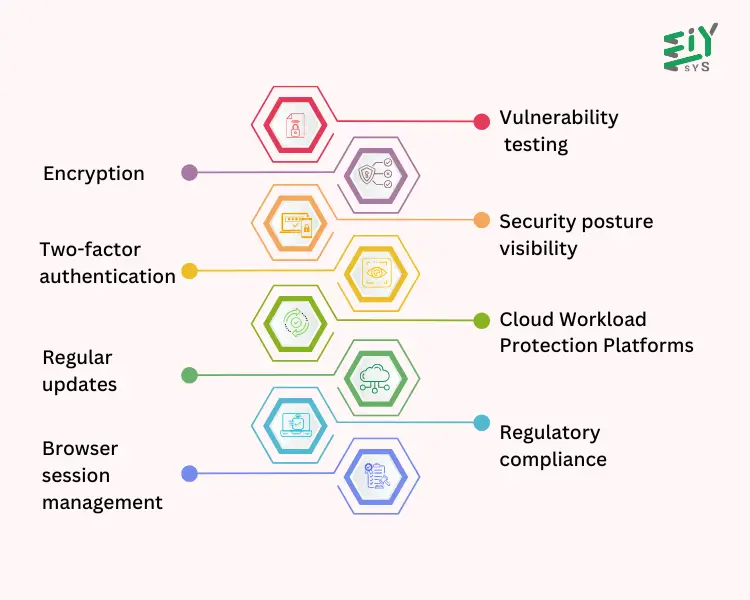
The methods for securing cloud apps are :
- Encryption: Apply strong encryption to protect sensitive data both while it’s being transferred and when stored. Encrypting data within your applications offers an added layer of protection for securing cloud apps.
- Two-factor authentication: Enable two-factor authentication to strengthen security. Biometrics like fingerprints and facial recognition make it more difficult to impersonate someone.
- Regular updates: Keep your cloud applications and servers up-to-date with the latest fixes and enhancements.
- Browser session management: Monitor who is accessing your cloud and manage browser sessions to prevent unauthorized users from gaining access.
- Vulnerability testing: Regularly test your cloud for weaknesses and address any potential vulnerabilities.
- Security posture visibility: Use appropriate tools to monitor your security posture and actively manage your cloud security.
- Cloud Workload Protection Platforms (CWPP): Implement CWPP to safeguard your cloud workloads from threats like malware, ransomware, DDoS attacks, misconfigurations, insider threats, and data breaches.
- Regulatory compliance: Ensure compliance with industry regulations by enforcing strict access controls, encryption, and conducting regular security audits.
What Are The Common Cloud Vulnerabilities ?
1. Misconfigurations
Misconfigurations occur when cloud applications or systems have incorrect security settings, such as on virtual machines, containers, or infrastructure as code (IaC). They often result from administrative mistakes, rapid development cycles, security misunderstandings, or a lack of awareness. These errors are major attack points for data breaches. Common examples include open ports, overprivileged user access, unsecured storage like open S3 buckets, and weak default credentials.
Example In 2022, McGraw Hill discovered that 22 TB of data, including personal student information, had been exposed since 2015 due to a misconfigured AWS S3 bucket. This misconfiguration allowed anyone with a browser to access 117 million files.
Mitigation:
- Use Cloud Security Posture Management (CSPM) tools to monitor and correct cloud configurations.
- Apply least privilege access principles.
- Use Infrastructure as Code (IaC) to maintain consistent, secure configurations.
2.Lack of Visibility
As businesses use a variety of cloud services from different providers, their IT environments become complex and constantly changing. Without full visibility, it is challenging to identify and address vulnerabilities effectively.
Example:Toyota Japan unknowingly exposed personal and vehicle data of 2.15 million customers for nearly a decade due to poor visibility, which could have helped detect and fix the issue earlier.
Mitigation:
- Implement centralized logging and monitoring across all cloud resources.
- Use Cloud-Native Application Protection Platforms (CNAPPs) for complete visibility.
- Set up alerts for unusual or unauthorized activities.
4. Poor Access Management
With digital identities outnumbering human identities in cloud environments, these identities become prime targets for cyberattacks. Identity Access Management (IAM) vulnerabilities are responsible for many data breaches.
Example: The Broward Health data breach resulted from an overprivileged third-party medical provider, exposing 1.3 million patient records.
Mitigation:
- Apply least privilege access to cloud resources.
- Use Role-Based Access Control (RBAC) to limit user permissions.
- Implement Multi-Factor Authentication (MFA) and Single Sign-On (SSO).
- Conduct training for proper access management.
5. Insider Threats
Insider threats involve individuals who already have access to an organization’s systems, such as employees, vendors, or partners. These threats may arise from negligence or malicious intent.
Example: In the Capital One breach, a former AWS employee exploited his knowledge of cloud systems to compromise personal data of 100 million Americans and 6 million Canadians.
Mitigation:
- >Monitor employee activities for unusual behavior.
- Apply strict access controls, even for trusted insiders.
- Conduct background checks for employees with critical access.
6. Unsecured APIs
APIs allow communication between cloud services and applications, but unsecured APIs are a common entry point for cybercriminals. Vulnerabilities include weak authentication, improper rate limits, and accidental data exposure.
Example: The 2022 Optus data breach occurred because an unsecured API was publicly available and lacked authentication, compromising the data of 10 million customers.
Mitigation:
- Implement strong authentication and authorization for cloud APIs.
- Use rate limiting and other protections to prevent misuse.
- Regularly scan APIs for vulnerabilities.
7. Zero-Day Vulnerabilities
Zero-day vulnerabilities are flaws in cloud software that have yet to be discovered by the vendor but are exploited by cybercriminals.
Example: Microsoft and Google have been victims of zero-day attacks in recent years, with vulnerabilities in Windows and Google Chrome that could allow remote attacks.
Mitigation:
- Keep software and systems up-to-date.
- Implement intrusion detection and prevention systems.
- Use virtual patching while waiting for official fixes.
8. Shadow IT
Shadow IT refers to the use of cloud resources without the approval of an organization’s IT department. It poses risks like unauthorized cloud workloads and data leaks.
Example:In the 2013 Target breach, a third-party HVAC vendor’s compromised system allowed attackers to infiltrate Target’s network and steal credit card details.
Mitigation:
- Eliminate unauthorized cloud applications.
- Establish clear security policies tailored to the organization’s needs.
- Use access controls to regulate cloud resource usage.
9. Lack of Encryption
Without proper encryption, cloud data is vulnerable to unauthorized access. Encryption transforms data into unreadable formats that can only be deciphered with the correct key.
Example: The 2017 Equifax breach, which exposed personal data of 147 million people, was worsened by the lack of encryption on sensitive data.
Mitigation:
- Encrypt data both in transit and at rest.
- Use secure protocols like HTTPS for cloud data transfers.
- Implement full-disk encryption and Transparent Data Encryption (TDE) for databases.
Cloud vulnerabilities like misconfigurations, lack of visibility, and poor access management are common in cloud environments. Addressing these cloud vulnerabilities is crucial to maintaining a secure cloud infrastructure and protecting sensitive data.
How Can You Secure Cloud Infrastructure ?
Here are some ways to secure cloud infrastructure:
- Encryption: Encrypt data both in transit and at rest to safeguard it from unauthorized access. Many cloud providers offer encryption services and key management tools to assist with this.
- Access management: Implement strong identity and access management (IAM) policies and controls. Make use of multi-factor authentication (MFA) and role-based access control (RBAC) to manage access securely.
- Information privacy: Cultivate a culture that prioritizes data protection. Ensure data is secured both in storage and while being transferred between different workloads.
- Cloud security posture management (CSPM): Use CSPM tools to monitor cloud environments for security risks, compliance gaps, and violations of best practices.
- Leverage cloud provider security features: Understand the shared responsibility model between you and your cloud provider to ensure both parties are meeting their security obligations.
- Cloud workload protection platforms (CWPP): Protect workloads across various cloud environments using CWPP solutions.
- Adopt a zero trust approach: Verify everything and ensure nothing is automatically trusted, whether it’s inside or outside the network.
These practices can help secure cloud infrastructure and minimize the security risks associated with cloud technologies.
What Are The Best Practices For Data Protection In Cloud?
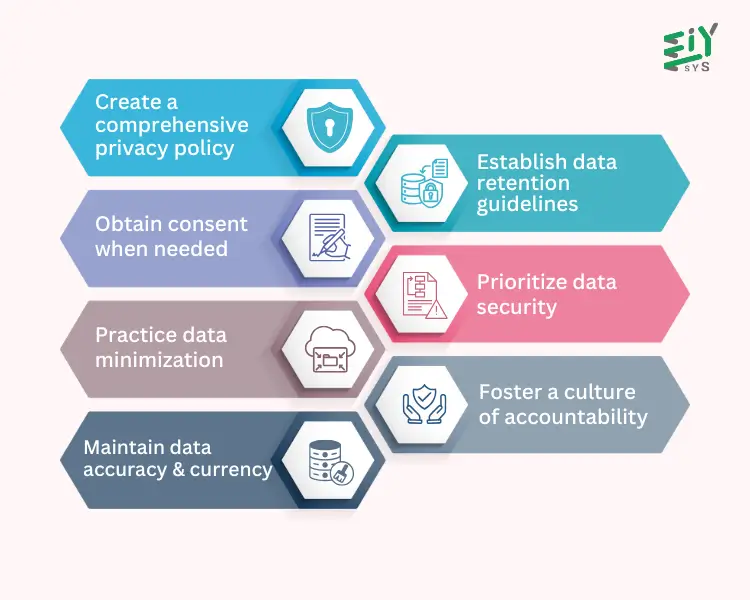
The best practices for Data Protection In Cloud
1. Create a comprehensive privacy policy: Your privacy policy should specify the types of personal data collected, its intended uses, and how individuals can exercise their rights under GDPR. It should be straightforward, easy to understand, and accessible, ensuring transparency for Data Protection in Cloud environments.
2. Obtain consent when needed:> If consent is used as the legal basis for processing personal data, ensure it is provided voluntarily, is specific, fully informed, and clear. Use opt-in methods and offer clear details about how the data will be used, particularly when it concerns Data Protection in Cloud storage.
3. Practice data minimization: Review your data collection processes to ensure only necessary information is gathered. Regularly check your data storage systems to remove unnecessary or outdated data.
4. Maintain data accuracy and currency: Continuously review and update the personal data you store, and allow individuals to correct or update their information as required.
5. Establish data retention guidelines: Define the period for which personal data should be retained for each specific purpose. Once it is no longer needed, ensure it is securely deleted or anonymized.
6. Prioritize data security: Implement robust technical and organizational safeguards to protect personal data from unauthorized access, loss, or damage. Regularly update security measures to adapt to emerging threats.
7. Foster a culture of accountability: Ensure that company leadership is committed to data protection, and train employees on GDPR compliance. Keep accurate records of data processing activities and be prepared for audits or investigations to demonstrate compliance.
How Do Cloud Security Tools Help Secure Cloud Data And Applications?
Cloud security tools safeguard cloud-based data and applications in various ways, such as:
- Encryption: Ensures that data is protected during transfer, preventing unauthorized access or modifications by third parties.
- Identity and Access Management (IAM): Regulates access to resources by confirming users’ identities and granting appropriate permissions.
- Cloud Access Security Broker (CASB): Enforces security policies by serving as a mediator between users and cloud service providers.
- Data Loss Prevention (DLP): Helps to secure sensitive information and prevent data leakage.
- Threat Protection: Tracks user behavior and interactions with cloud services to identify and prevent threats.
Other cloud security tools include Static Application Security Testing (SAST), Secure Access Service Edge (SASE), Cloud Security Posture Management (CSPM), and Cloud Workload Protection Platforms (CWPP).
Cloud security is a critical area of cybersecurity that focuses on protecting data and digital assets within cloud environments, with responsibility shared between cloud providers and their clients.
Conclusion
At EIY Sys, we recognize the critical need for Cloud Application Security in today’s fast-paced digital world. To effectively secure cloud environments, it’s essential to implement a range of cloud security best practices and use robust cloud security tools to tackle potential cloud vulnerabilities. Focusing on methods like encryption, identity and access management, and constant monitoring can help safeguard sensitive data. It’s also important to prioritize data protection in cloud and protect systems from unauthorized access.
Furthermore, understanding how to secure cloud infrastructure by configuring systems correctly and adopting the shared responsibility model is key to minimizing risks. By securing cloud environments with these approaches, businesses can ensure their cloud systems are protected, mitigate risks, and safeguard their digital assets against emerging cyber threats.
Frequently Asked Questions
Cloud application security involves the policies, processes, and safeguards to protect cloud-based applications from potential threats, including measures like authentication, access control, encryption, and managing vulnerabilities.
Key practices include understanding shared responsibility, securing the perimeter, using identity and access management (IAM), encryption, performing vulnerability assessments, and applying a zero-trust strategy.
Businesses can protect their cloud apps by using encryption, enabling multi-factor authentication, keeping systems updated, managing sessions, conducting regular vulnerability tests, and ensuring compliance with regulations.
Typical vulnerabilities include misconfigurations, weak access management, insider threats, insecure APIs, and poor visibility, which can lead to data breaches.
The shared responsibility model explains that cloud providers handle infrastructure security, while businesses are responsible for securing their applications, data, and configurations.