In 2024, improved customer experience is at the top of everyone’s agenda and CRM software is the only way to deliver it across all channels. By integrating CRM software Salesforce into email and accounting software like CRM that integrates with Quickbooks, businesses can better manage customer relationships.
CRM with email integration that serves smooth communication. CRM that integrates with QuickBooks provides a single point of access to financial data. Companies increase customer satisfaction and loyalty by using the CRM that integrates with Quickbooks and other integrated tools at work.
CRM software integration goes beyond operational benefits; it changes how businesses interact with their customers. Let’s explore how CRM software integrations are preparing the customer experience for 2024 in this blog.
What is the Role of CRM Software Integration in Enhancing the Client Experience in 2024?
Smooth CRM software can do much to raise customer satisfaction in an age when customers want personalization at speed. The reason is that CRM systems will integrate smoothly with many platforms and tools in 2024, enabling companies to view data from all sources in one place. In this way, customer service agents can have all relevant information at their fingertips, view the customer’s history and give informed answers.
Communication can be more personalized with CRM software integration at an advanced level. Businesses can make content and offers based on the behavior and preferences of their customers using marketing automation integration. If a company does CRM with email integration for a marketing platform, it can send customized promotions based on recent interactions and customer interests.
The level of personalization certainly increases customer engagement, but more importantly, it allows the customer to feel a much stronger connection with the brand, which may result in a higher level of satisfaction.
Data analytics and automation, combined with smooth CRM software integration, support proactive customer service. In integrated CRM systems, advanced analytics helps predict customer needs and prevent issues in advance, or, if that’s not possible, to keep them from getting worse.
As a result, automated workflows may trigger follow-ups or reminders on a regular basis based on customer interactions, preventing any missed opportunities for engagement. A company that offers good customer service creates long-term loyalty by making its customers feel valued and well looked after during their journey with them.
How can Salesforce and CRM Software Integration Work Together?
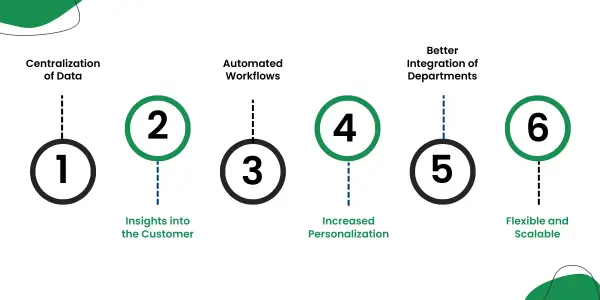
1. Centralization of Data
In an integrated CRM software Salesforce system, all customer information is maintained on one platform. Serializing procedures can increase data accuracy by serializing procedures. Sales, marketing and customer service teams receive the same information.
2. Insights into the Customer
Integrating CRM software Salesforce provides advanced analytics and reporting insights that help businesses leverage customer insights related to behavior and preferences. Making better decisions and formulating strategies can be made easier with the help of this information.
3. Automated Workflows
Automation of workflow can be done through Salesforce integration, making operations more efficient. A follow-up and lead management process is automated, so there is no need to manually handle them. By doing so, we would be able to respond to requests faster and process them more effectively.
4. Increased Personalization
Through the integration, interactions with the client can be tailored more closely to their needs. CRM may use the integrated data to tailor correspondence and any offers based on the history. Customer engagement can be improved and relationships can be strengthened through such personalization.
5. Better Integration of Departments
Salesforce is integrated to improve collaboration between departments. Having real-time access to customer insights and updates facilitates teamwork, which facilitates improved customer service and satisfaction.
6. Flexible and Scalable
The scalability of Salesforce allows businesses to grow without worrying about losing access to these important tools. A CRM system can be integrated through flexible customization and adaptation to the changing requirements of the business. Having scalable CRM solutions ensures your business remains effective as it grows.
How does CRM with Email Integration Improve Customer Service?
Through the CRM with email integration, customers are able to centralize their email interactions within the CRM system, drastically improving customer communication. Consequently, it makes it possible for any company to track and manage CRM with email integration correspondence directly alongside customer profiles. The system ensures the recording and accessibility of all communications. In this way, procedures such as follow-ups and automated responses are easier and more efficient, allowing customer communications to be uniform and timely.
- Unified Communication History: Deliver a single view of Customer communication history by capturing all email interactions in one place.
- Personalized Messaging: Make your email content relevant to each customer’s needs and preferences using CRM information rather than plain, one-size-fits-all emails.
- Quick Response Time: Allow users to respond to email more quickly and spend less time manually tracking emails.
- Great Team Collaboration: All email threads can be shared with teams for uniform customer service.
- Strong Analytics: Track key metrics for your emails, including delivery rate, open rate and click-through rate, to improve your results.
What Are the Best CRM for Quickbooks?
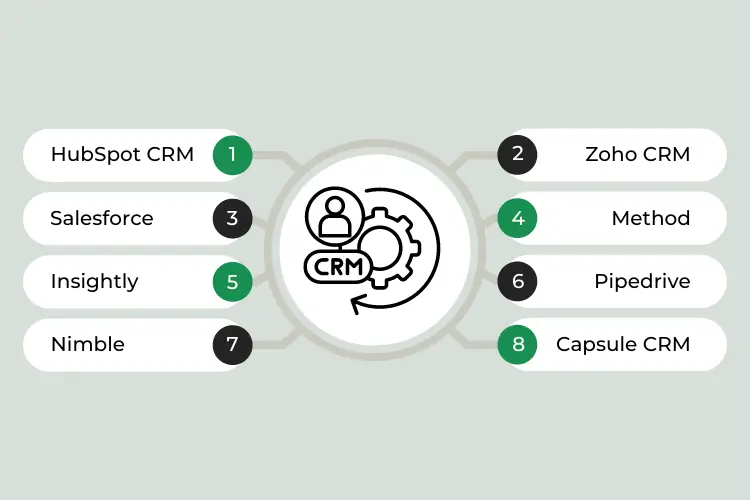
CRM (Customer Relationship Management) systems that integrate well with QuickBooks should consider factors such as ease of integration, feature set and how well it complements QuickBooks for managing customer relationships. Here are Best CRM for QuickBooks include:
1. HubSpot CRM
HubSpot CRM’s user-friendly interface and robust feature set make it a popular choice. With third-party apps like HubSpot’s QuickBooks Integration, it offers seamless integration with QuickBooks. Using this integration, you can sync customer and financial data between HubSpot and QuickBooks, automate invoicing and track sales and revenue.
2. Zoho CRM
Zoho CRM offers extensive customization options and integrates smoothly with QuickBooks via Zoho Books. Using this integration, financial data can be managed, sales can be tracked and workflows can be automated. Besides providing comprehensive analytics and reporting features, Zoho CRM also helps enhance customer relationships.
3. Salesforce
The Salesforce CRM is a powerful CRM that offers many customizable features. Third-party connectors, such as QuickBooks Connector for Salesforce, allow it to be integrated with QuickBooks. As a result of this integration, customer information, sales transactions and financial reports are synchronized seamlessly, making managing and analyzing customer data easier.
4. Method
It offers a native integration with QuickBooks, syncing customer data, invoices and transactions between the two systems. Known for its deep integration with QuickBooks, it provides a unified view of customer interactions and financials.
5. Insightly
With Insightly, you can manage your projects, CRM and projects using third-party apps that are integrated with QuickBooks. In addition to syncing contact information, managing pipelines and accessing financial data, this integration helps streamline operations and enhance customer relationship management.
6. Pipedrive
The Pipedrive CRM integrates with QuickBooks via third-party connectors. Invoicing is automated, sales data is synced and customer interactions are tracked through this integration. In addition to its intuitive interface and pipeline management capabilities, Pipedrive is known for its ease of use.
7. Nimble
The Nimble CRM integrates with QuickBooks through third-party applications. As well as tracking customer interactions across social media platforms, it helps manage contacts and sales activities. With Nimble’s QuickBooks integration, financial management and customer tracking are streamlined.
8. Capsule CRM
Capsule CRM’s interface is easy-to-use and it integrates with QuickBooks using third-party tools. Small and mid-sized businesses can use the integration to synchronize contact details, manage sales processes and track financial transactions.
Conclusion
The key driver of brand loyalty and customer satisfaction in the year 2024 will be smooth CRM software integration. Using a single platform, businesses can centralize data, streamline workflows and personalize client interactions across all touchpoints with tools such as CRM software Salesforce and CRM that integrates with QuickBooks. Providing these services not only improves operational efficiency but also allows companies to deliver a customer experience that will result in long-term brand loyalty and deeper relationships with their customers.
Furthermore, Eiy sys is incorporating CRM software integration into Enhancing Customer Experience at a rapid pace. Eiy sys provides expertise in best CRM for Quickbooks to enable Enhancing Customer Experience to increase data integrity, minimize administrative workloads and expedite compliance procedures. Integrating software can help Enhancing Customer Experience comply with regulations while maintaining the highest level of data security and patient treatment.
Frequently Asked Questions
Integrated CRM software connects Customer Relationship Management (CRM) systems with other business applications, such as email, accounting software, marketing platforms, or ERP systems. Integrating these systems improves efficiency, data accuracy and overall business operations by allowing seamless data flow between them.
Integrating CRM software allows businesses to consolidate data from various sources into a single, unified system. The integration streamlines processes, avoids duplicate data entry and provides a comprehensive view of customer interactions. Enhancing productivity by automating workflows and improving data accessibility leads to better decision-making and customer service.
Many software applications can be integrated with CRM systems, including email marketing tools, accounting and financial software (like QuickBooks), social media platforms, customer support systems, e-commerce platforms and ERP systems. By integrating these tools with CRM, you can centralize customer data, automate processes and synchronize information across business units.
It is important to evaluate your business needs and identify the software applications you need to connect when selecting a CRM integration. Ideally, CRM solutions should offer built-in integrations or support third-party integration tools. In order to ensure the integration meets your business objectives, evaluate the ease of integration and compatibility with your current systems.