Zoho integrations allow businesses to simplify workflows by integrating well with third-party tools. Be it the integration of CRM systems or linking automation tools, Zoho applications make everything very easy to manage in one place. This saves time, minimises manual work, and improves productivity for businesses.
The reason that makes Zoho integrations unique is the way they are configured to help businesses create solutions customised to their needs—from integrating different software for automating redundant tasks to even integrating favourite automation tools or as deep as organisational levels by using Zoho apps for customers’ data. Zoho offers adaptation and growth without a worry over the technical limitations of businesses.
Also, one of the most significant strengths of Zoho is that it integrates with virtually any third-party tool. Hence, it’s best for companies operating on a range of platforms. For Zoho integrations, your needs for CRM, automation, or sophisticated software, the apps provided by Zoho are fantastic and scalable options for keeping everything in a networked, smoothly running connection.
How does Zoho Apps Support Multi-Platform Software Integrations?
Zoho applications are designed to provide smooth integrations between multiple platforms, which makes them the most preferred applications in a business setup. With these integrations, organizations can connect with third-party tools easily, ensuring unified workflows and increased productivity. Additionally, Zoho integrations allow users to connect CRM systems, automate tasks, and better manage customers. More importantly, these integrations make the complex processes much easier by enabling smooth communication between the diverse platforms.
Moreover, Zoho apps are flexible and adaptable, two very important aspects for any successful software integration. Businesses can use third-party tools with Zoho apps to manage operations such as project tracking, customer relations, and data analysis. Second, the advanced automation tools provided by Zoho ensure that repetitive tasks are handled efficiently, saving time and resources.
First and foremost, with Zoho integrations, business organizations can scale and customise their operations according to the needs. The integrations of these software tools connect third-party tools easily, making an ecosystem that is both cohesive and efficient. Additionally, Zoho applications support strong CRM integration that helps an organization manage its customer data smoothly. More importantly, it comes with automation tools that will enable the optimisation of workflows, ensuring increased productivity within the firm.
What Third-Party Tools Integrate Easily with Zoho Apps?
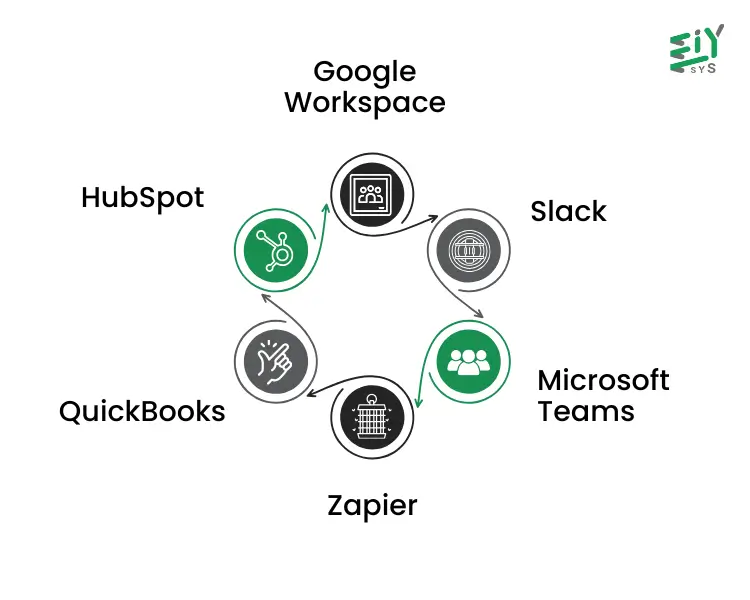
1. Google Workspace
Zoho apps integrate with Google Workspace, allowing users easy access to Gmail, Drive, and Calendar. Integrating these helps in better collaboration and simplifying workflows by interlinking these essential third-party tools. This way, the user also experiences smooth integrations of software—meaning all their systems are now well connected.
2. Slack
Zoho apps are integrated with Slack to make communication and team collaboration smooth. This integration will let users link third-party tools for the easy management of tasks and updates. Moreover, it increases productivity as it automates notifications and workflows, keeping the teams updated.
3. Microsoft Teams
Integration with Microsoft Teams enables Zoho apps third-party tools, businesses can manage meetings, tasks, and files in one place. Furthermore, this software integration simplifies team coordination and improves overall efficiency.
4. Zapier
Zoho apps are connected to a long list of third-party tools through Zapier, which enables strong automation tools for custom workflows. This way, users can automate repetitive tasks, saving a lot of manual effort and increasing efficiency. Additionally, Zapier ensures software integration transfers between different platforms.
5. QuickBooks
Zoho apps integrate with QuickBooks to smooth financial management and accounting processes. This ensures that businesses can track their expenses, generate invoices, and manage payments effectively. Moreover, it reduces errors by automating data synchronisation.
6. HubSpot
HubSpot integration improves the CRM capabilities of Zoho apps, allowing users to manage leads, campaigns, and customer data effortlessly. Additionally, this integration enables smooth collaboration between marketing and sales teams, improving business outcomes.
What Are the Top Software Integrations for Zoho Users?
Zoho integrations are a powerful solution for businesses aiming at increasing operational efficiency. The connection of Zoho apps with third-party tools allows companies to smooth workflows and improve productivity. Moreover, these integrations will simplify CRM processes and bring in automation tools that will handle repetitive tasks more effectively.
Key Software Integrations:
- Google Analytics: Provides insights into website traffic, user behaviour, and campaign performance, helping businesses make informed decisions.
- Asana: Enables project tracking and task management, ensuring teams remain aligned and productive.
- PayPal: Integrates with Zoho apps to simplify payment processing, invoicing, and transaction tracking securely.
- Twilio: Integrates SMS and voice features right from the Zoho applications using Twilio’s communication abilities.
- Marketo: Improve the campaigns with marketing automation tools that are designed to track and nurture leads.
- LinkedIn Ads: Syncs ad performance data with Zoho CRM, giving valuable insight to create targeted marketing strategies.
Conclusion
In conclusion, Zoho integrations enable businesses to connect Zoho apps with numerous third-party tools. Moreover, these software integrations will simplify your workflows and improve productivity. More importantly, CRM integration boosts better customer management, turning Zoho into a versatile choice for businesses. Last but not least, it ensures flawless operations through automation tools, hence showing the adaptability of Zoho integrations.
Moreover, Zoho integrations are changing businesses by enabling smooth connectivity with third-party tools. At EIY SYS, our expertise ensures businesses utilise Zoho apps for better CRM integration and operational efficiency. Additionally, software integrations simplify workflows and improve task automation. By utilising automation tools, companies can smooth processes while achieving improved productivity and customer satisfaction.
Frequently Asked Questions
Zoho integrations enable businesses to connect Zoho apps with third-party tools, ensuring smooth workflows. Additionally, these integrations support software integrations, improving efficiency and reducing manual tasks.
Third-party tools improve the functionality of Zoho apps by providing additional features. Moreover, they simplify CRM integration and improve task automation, offering comprehensive software integrations.
Zoho CRM, Zoho Projects, and Zoho Books provide excellent third-party tool integrations. Furthermore, these apps simplify workflows with automation tools and strong software integrations.
Zoho integrations smooth repetitive tasks by enabling automation tools. Additionally, they connect third-party tools with Zoho apps, ensuring operational efficiency and smooth workflows.