Manage multiple social media accounts. It seems easy and efficient with Zoho Social, so managing anything becomes simple.Zoho Social eases the presence on social media for businesses, making it relatively easier to take care of multiple platforms all in one dashboard. You handle accounts for a small business or big agency; there’s no doubt that Zoho Social is powerful enough to bring your disorganization and connectivity together.
Zoho stands out from others due to customized plans tailored to your requirements. Right from scheduling posts to checking analytics, the flexibility of managing all your platforms is possible through Zoho Social. For agencies, Zoho Social provides agency solutions with certain specific features on the management of multiple client accounts, thus being the favorite for professionals in the field.
Zoho Social further connects with more expansive platforms while offering the possibility of ad management, for instance, through applications like Zoho Facebook Lead Ads, which provides you with an effortless means of managing your campaigns. It’s founded to fit perfectly with the size of any business and is affordable for any organization that seeks the best bang for the buck. The cost of Zoho Social makes it accessible to businesses of any scale; thus, premium features can be enjoyed without a large price tag.
How Does Zoho Social Simplify Multi-Account Management?
Zoho Social integrates all your social media accounts easily with an intuitive dashboard to help manage more than one account. Whether needed to address multiple accounts for different brands or tackle several platforms for one business, you can easily switch between profiles and track performance on Zoho Social. With smooth collaboration support, teams can work together and manage content pretty well on various channels.
It includes a strong scheduling feature that lets you make posts ahead of time for all your social profiles. This is useful for agencies that handle numerous clients. Agency tools from Zoho Social streamline workflows so nothing ever gets disrupted: posts go live at the best possible times. With the use of Zoho social media, all engagement can be tracked and analyzed while providing a view of how all of your accounts are doing.
It integrates with key advertising tools such as Zoho Facebook Lead Ads. The idea here is to make the running and management of the campaigns across the platforms easy. Such flexibility in pricing will allow all the benefits of more strong features enjoyed by even the smaller and medium-sized businesses or large agencies without breaking the bank. As long as the cost remains affordable, multi-account management is well provided.
Why is Zoho Social a Leading Option for Account Management Agencies?
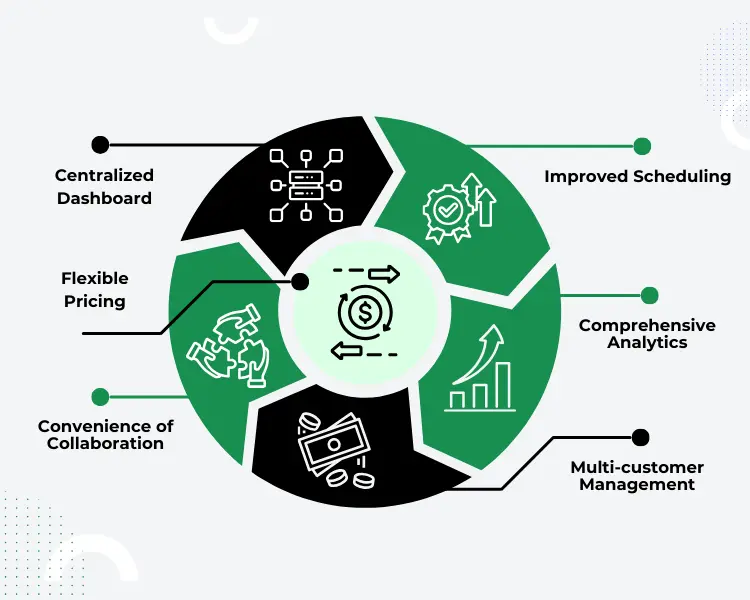
1. Centralized Dashboard
Agency dashboard: It offers agencies one place to manage many client accounts. Zoho Social integrates all social media profiles into the interface, and therefore, one can quickly access and administrate them from one place. This saves agency time and improves effectiveness while handling many brands.
2. Improved Scheduling
Scheduling through Zoho Social allows agencies to make multiple posts in advance for different clients. Scheduling media through Zoho Social will help streamline automated posts on various platforms, thus keeping the process of content uninterrupted. This will be important for agencies that want to comply with all deadlines without constant manual efforts.
3. Convenience of Collaboration
Zoho Social allows teams to work harmoniously together by letting team members work together. With Zoho Social , the agencies can assign roles, review posts, and monitor activity, which becomes very helpful when dealing with multiple accounts. No posting will go live by any person without an administrator’s approval.
4. Comprehensive Analytics
Social analytics on Zoho Social include campaign reporting but track and optimize client campaigns in far more detail. Once more, from engagement metrics to ad performance, Zoho Social Media insights help make data-driven decisions. Customizable reporting helps agencies provide reports with the ease of use of such features on Zoho Social.
5. Multi-customer Management
Zoho Social Agency tools are for agencies managing multiple accounts on one platform. Easy flipping of accounts is enabled, as is real-time handling of each client’s social media presence. Thus, the agencies will be able to ensure every client gets excellent services without confusion, as expected.
6. Flexible Pricing
Zoho Social is agency-focused, so scalable plans are based on client needs. The cost of Zoho Social stays low while its advanced features stay within budget. This makes it a very good and quite cost-effective value for managing social media at any scale through an agency.
How Do Multi-Account Campaigns Using Zoho Facebook Lead Ads Work?
This integration of Zoho Social with Zoho Facebook Lead Ads helps manage more accounts easily. It supports running lead generation targeted ads right from the interface itself by connecting your Facebook ad accounts with Zoho Social. Thus, tracking performance becomes simpler, above all, for businesses and agencies that need to manage multiple clients or brands. Internal integration will give access in one place to all advertising data, better insights, and quicker changes.
- Connect Facebook ad accounts directly with Zoho Social to make management easy.
- From a single platform, easily create, launch, and monitor multiple Facebook Lead Ads for numerous accounts.
- Use Zoho Social to track every lead in real time for all campaigns.
- Team Collaboration Management of the ad campaigns of the clients utilizing Zoho Social.
- Zoho Analytics uses social media to track the success of your Facebook Lead Ads.
- Adjust ad settings and budgets directly from Zoho Social without switching platforms.
Conclusion
In conclusion, with Zoho Social, you can be on top of your social media accounts as it brings into one platform all sorts of tasks that businesses and agencies would otherwise have had to deal with. Switching through multiple brands is very easy; you can manage multiple platforms for a single business as well. Customizable features, such as scheduling posts or detailed analytics, ensure you’re always one step ahead of the game and connected. Multi-client management tools at Zoho Social help agencies, but with integrations like Zoho Facebook Lead Ads, campaign management becomes easy.
Moreover, Zoho Social is being integrated into multi-account management by EIYSYS at a leading pace. Our expertise allows businesses to streamline social media operations, reduce manual tasks, and improve collaboration across platforms. By using Zoho Social’s tools, companies can efficiently manage multiple accounts while maintaining consistency in brand communication and data security. With Zoho Social, businesses can easily comply with social media best practices, ensuring a smooth and organized approach to managing various accounts and client interactions.
Frequently Asked Questions
Zoho Social provides a unified dashboard, allowing you to manage multiple social media accounts from one platform. This streamlines content posting, scheduling, and performance tracking across all accounts effortlessly.
Yes, Zoho Social’s scheduling feature lets you plan and schedule posts for multiple accounts in advance. This ensures that your content goes live on time without constant manual effort.
Zoho Social offers specialized tools for agencies to manage multiple client accounts. Its features allow smooth switching between accounts, managing workflows, and tracking performance metrics for each client.
Zoho Social offers comprehensive analytics for each account, helping you track engagement, performance, and audience insights. This makes it easy to monitor the success of campaigns across multiple accounts.