
Common Tally errors may cause accounting mistakes, reporting discrepancies, and regulatory problems if they are not recognized and fixed on time. Businesses widely use tally for their accounts, but wrong usage normally brings issues like inacCommon Tally mistakescurate data input, mis-set-up accounts, and unbalanced ledgers. Awareness of these errors is important to maintain correct records and have a seamless financial system.
A common cause of such errors is poor training and familiarization with features of Tally. Duplicate posting, incorrect grouping of ledgers, and lost reconciliations can lead to discrepancies in accounting statements. A lack of judicious use of automation tools may also result in manual effort and inefficiencies. We at Eiy sys prevent businesses from these errors by rendering professional advice, training, and strategies to better utilize Tally.
To avoid these errors, one must take a proactive step in the form of regular validation of data, correct classification of expenses, and periodic backups to avoid data loss. Following best practices and using Tally properly can help companies simplify their accounting operations, increase accuracy, and comply with financial regulations.
Are Common Tally Mistakes Hurting Your Business Growth?
Avoiding common Tally mistakes is vital for ensuring accurate financial data and smooth operations. Mistakes such as improper entries and configured settings have the potential to cause severe accounting mistakes, impacting financial reporting and decision-making. Routine checks and correct training can assist businesses in avoiding such problems and maintaining reliable financial data.
One of the most important things in Tally troubleshooting is pinpointing inefficiencies in operations daily. Most users do not utilize vital features, causing errors and unnecessary manual effort. Minor software tips, like using shortcut keys and automation aids, can help reduce inaccuracies and save time. Having proper tax settings and backup regularly also prevents compliance risks and data loss.
Adhering to bookkeeping best practices increases Tally efficiency and strengthens financial management overall. Firms must update their software now and then, reconcile accounts promptly, and account for transactions effectively. If implemented the right way, companies can reduce errors, boost productivity, and achieve financial stability in the long run.
What Are the 10 Common Tally Mistakes and How to Avoid Them?
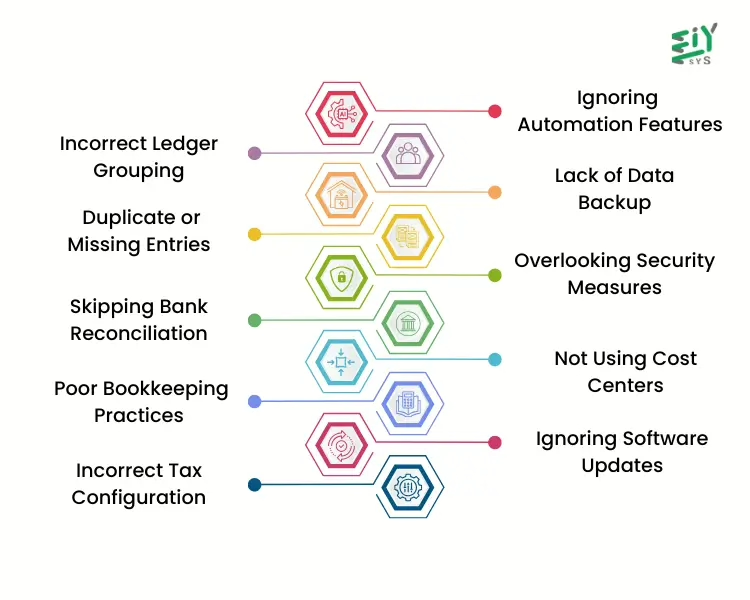
Using Tally effectively is crucial for accurate financial management. However, many businesses face challenges due to common mistakes, which can lead to financial discrepancies, compliance issues, and operational inefficiencies. Understanding these mistakes and taking the right steps to prevent them can help businesses streamline their accounting processes and maintain accurate records. Below are ten common Tally mistakes and how to avoid them.
1. Incorrect Ledger Grouping
Mistake: Many users misclassify ledger accounts, placing them in the wrong groups, which leads to errors in financial reports such as the balance sheet and profit and loss statements. This misclassification can make it difficult to track expenses, revenue, and liabilities accurately.
How to Avoid: Always review and categorize ledgers correctly based on business requirements. Utilize Tally’s predefined ledger groups and cross-check with accounting principles to ensure correct classifications.
2. Duplicate or Missing Entries
Mistake: Entering the same transaction multiple times or missing transactions altogether leads to discrepancies in financial statements. This results in overstatement or understatement of income and expenses, making it difficult to maintain accurate records.
How to Avoid: Regularly verify transactions using Tally’s validation features. The Tally troubleshooting tools can help detect duplicate entries, while periodic reconciliations ensure that no transaction is missed.
3. Skipping Bank Reconciliation
Mistake: Failing to reconcile bank transactions with Tally records can cause mismatched balances, leading to confusion and potential financial mismanagement.
How to Avoid: Perform bank reconciliations frequently using Tally’s bank reconciliation feature. Compare statements with recorded transactions to ensure accurate cash flow management.
4. Incorrect Tax Configuration
Mistake: Setting up incorrect tax configurations, such as GST, VAT, or TDS, can result in inaccurate tax calculations and legal penalties. Businesses may overpay or underpay taxes, leading to compliance issues.
How to Avoid: Ensure tax settings are properly configured in Tally. Regularly update tax rules and validate transactions to avoid accounting errors in tax filings.
5. Ignoring Automation Features
Mistake: Many businesses still process invoices, payroll, and reports manually, increasing the chances of human error and slowing down financial processes.
How to Avoid: Use automation features in Tally to reduce manual workload. Explore software tips, such as setting up recurring invoices and enabling auto-calculations for taxes and discounts, to enhance efficiency and accuracy.
6. Lack of Data Backup
Mistake: Not maintaining backups can result in complete data loss due to system crashes, cyberattacks, or accidental deletions. Losing financial data can disrupt business operations and cause compliance issues.
How to Avoid: Set up automatic backups and store copies on external drives or cloud storage. Regularly test backup files to ensure they can be restored if needed.
7. Overlooking Security Measures
Mistake: Granting unrestricted access to Tally can lead to unauthorized modifications, fraud, or data breaches, putting sensitive financial information at risk.
How to Avoid: Implement role-based permissions and limit access to critical financial data. Enable audit trails in Tally to track modifications and ensure data integrity.
8. Not Using Cost Centers for Expense Tracking
Mistake: Businesses that fail to allocate expenses to cost centers struggle to analyze financial performance by department, project, or location.
How to Avoid: Enable cost centers in Tally to categorize expenses efficiently. This improves Tally efficiency by allowing businesses to monitor spending patterns and optimize budgeting decisions.
9. Ignoring Software Updates
Mistake: Using outdated versions of Tally can result in security vulnerabilities, missing features, and software bugs that affect performance.
How to Avoid: Regularly check for updates and install the latest version of Tally to access improved features, security patches, and bug fixes.
10. Poor Bookkeeping Practices
Mistake: Inconsistent record-keeping, missing invoices, and unorganized data entry lead to inaccurate financial statements and tax issues.
How to Avoid: Follow bookkeeping best practices, such as maintaining structured financial records, regularly reviewing reports, and ensuring that all transactions are recorded properly.
How Does Tally Troubleshooting Improve Tally Efficiency?
Tally troubleshooting is crucial for maintaining error-free financial records and ensuring seamless business operations. By detecting and fixing common issues, businesses can prevent financial miscalculations and optimize efficiency. Addressing errors early helps improve accuracy, reduces manual effort, and ensures compliance with accounting standards. Here’s how effective troubleshooting can enhance your Tally experience:
- Identifies and fixes issues – Regular monitoring helps detect misclassified accounts, incorrect tax calculations, and data entry mistakes, reducing accounting errors and ensuring accurate financial reports.
- Improves transaction accuracy – Proper reconciliation of invoices, payments, and bank statements ensures that all transactions are correctly recorded, minimizing discrepancies.
- Enhances software performance – Keeping the system updated and resolving bugs with expert software tips prevents crashes, slowdowns, and performance issues.
- Reduces manual workload – Automating financial tasks, such as ledger updates and reporting, improves Tally efficiency and allows employees to focus on strategic work.
- Ensures compliance – Following financial regulations and maintaining proper records in line with bookkeeping best practices helps avoid penalties and audit complications.
- Prevents system slowdowns – Routine checks and error resolution through Tally troubleshooting keep the software running smoothly, preventing data corruption and workflow disruptions.
- Minimizes financial risks – Identifying errors in tax filings, bank reconciliations, and expense tracking early helps businesses avoid costly miscalculations and ensures financial stability.
Boosts automation accuracy – Properly configuring automated processes ensures reports, invoices, and financial summaries are generated correctly, reducing the chance of errors and improving workflow.
Conclusion
In Conclusion, Avoiding common Tally mistakes is crucial for maintaining financial accuracy and operational efficiency. Regular reconciliations, system updates, and proper data entry practices help prevent errors, ensuring smooth accounting processes and compliance.
Eiy sys provides expert Tally solutions, assisting businesses in optimizing bookkeeping, troubleshooting errors, and streamlining financial management. With tailored support, Eiy sys ensures accurate records, improved efficiency, and seamless business operations.
Frequently Asked Questions
Large data volumes, outdated versions, and improper configurations can affect speed. Regular maintenance, clearing unnecessary records, and updating settings can enhance efficiency.
Errors in ledger grouping, tax calculations, and data entry are frequent issues. Conducting periodic audits, training staff, and reviewing transactions before finalizing can minimize mistakes.
Identifying error messages, checking data consistency, and using built-in diagnostic tools can help resolve most problems. Keeping regular backups before making significant changes is a good practice.
Maintaining structured ledgers, reconciling statements frequently, and setting up correct tax parameters can keep records precise and compliant with regulations.
Automating repetitive tasks, customizing reports, and utilizing advanced features can reduce manual work, prevent mistakes, and improve overall financial management.