
Zoho Creator is an effective tool for businesses to create customized applications without the necessity for high-level coding knowledge. The platform has an easy-to-use drag-and-drop interface, with which one can easily create forms, store information, and automate workflows. No matter if one needs to store customer information, monitor projects, or accelerate approvals, this platform enables businesses to manage their work more efficiently. Through minimizing manual labor and automating tasks, it saves time and enhances productivity.
Eiy sys is well-versed in Zoho Marketing Automation and business workflow enhancement and is therefore an excellent pick for businesses that wish to effectively utilize this software. We assist firms in developing applications specific to their requirements, automating tedious tasks, and integrating with other tools such as Zoho Campaigns. Their experience enables organizations to work with information more efficiently, minimize errors, and receive valuable reports to help them make good decisions. Using Eiy sys as their guide, businesses can maximize automation to enhance their day-to-day work.
With the proper configuration, this platform has the potential to transform the way companies execute their tasks by making work more efficient and better organized. If you have a small business or a big corporation, it can assist you in implementing various processes more efficiently. Through the ability to tailor applications, automate repetitive tasks, and integrate with other business tools, businesses can enhance collaboration and accomplish more within less time.
How Can You Optimize Workflows Efficiently With Zoho Creator?
You can enhance workflows by automating mundane tasks. Rather than entering data or sending out emails manually, you can automate these tasks using workflow automation. This saves time and minimizes human error, enabling you to concentrate on more significant work. Form rules, approval processes, and scheduled tasks are some of the features that enable businesses to operate smoothly without continuous manual interventions.
One of the good methods of improving processes is with the use of Zoho low-code platform to interface with other software. It has good compatibility with different business software, such as Zoho CRM, Zoho Books, and third-party tools. This enables easier sharing of data and keeps various operations intertwined. With the integration of multiple tools, companies prevent redundant data input and enhance business process management within departments.
Customization of dashboards and reports also enhances workflows. With custom apps, companies can develop solutions that meet their particular needs, and the workflow is smoother. Reports yield important information that enables better decision-making. By adopting the appropriate productivity tools, you can monitor progress, see areas that require focus, and enhance total efficiency.
Tips to Optimized Workflow Automation for Better Efficiency
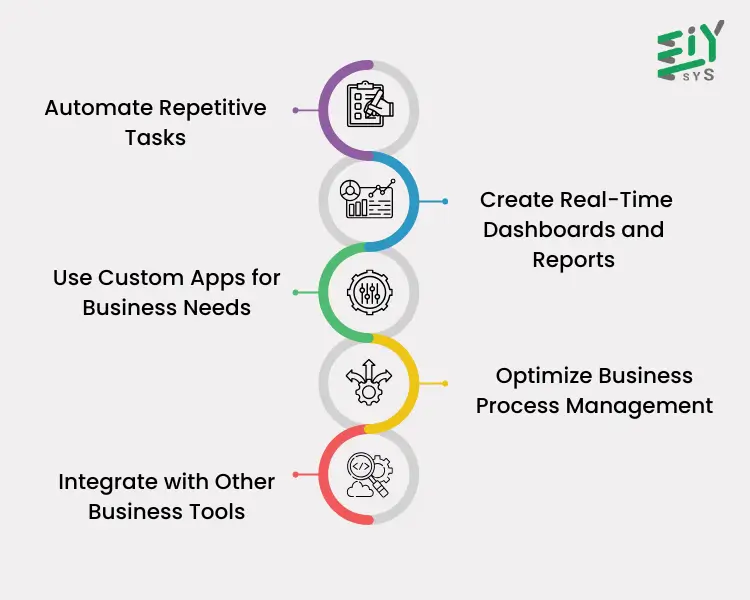
Optimizing workflow can significantly enhance business efficiency by saving time, reducing human errors, and improving overall productivity. With the right tools and strategies, companies can automate repetitive tasks, improve data accuracy, and ensure smoother operations. By leveraging automation, businesses can focus on strategic growth rather than manual, time-consuming processes. Here are some key tips to make the most of workflow automation for better efficiency.
1. Automate Repetitive Tasks
Repetitive tasks like data entry, email notifications, and approval processes can consume a lot of time when done manually. Automating these tasks ensures consistency, reduces the risk of errors, and allows employees to focus on higher-value work. Businesses can set up workflow automation to trigger actions based on specific conditions, ensuring that tasks are completed on time without the need for manual intervention.
2. Use Custom Apps for Business Needs
Every business has unique workflows that off-the-shelf solutions may not fully address. Developing custom apps tailored to specific needs can help optimize operations. These applications allow businesses to create forms, databases, and automated workflows that align perfectly with their processes. This ensures better efficiency and improves user experience by providing a structured and organized approach to managing data.
3. Integrate with Other Business Tools
Automation becomes even more effective when integrated with other business tools. Using the Zoho low-code platform, companies can connect their automation solutions with various applications, including Zoho CRM, Zoho Books, and third-party tools. This ensures seamless data flow across departments, reduces duplicate data entry, and improves collaboration, making business operations more efficient.
4. Create Real-Time Dashboards and Reports
Monitoring workflow performance is essential for making informed business decisions. Real-time dashboards provide a visual representation of key performance indicators, helping teams track progress and identify bottlenecks. Automated reports can be generated at regular intervals, providing insights into task completion times, employee performance, and overall efficiency. These insights enable businesses to use productivity tools effectively and make data-driven decisions.
5. Optimize Business Process Management
Efficient business process management ensures that workflows are structured and run smoothly. Clearly defining roles and responsibilities, automating approval hierarchies, and setting up process-based triggers can significantly improve efficiency. Eliminating unnecessary steps, reducing bottlenecks, and refining workflows help businesses operate more effectively. Additionally, regular audits and updates to workflows ensure that automation continues to meet evolving business needs.
How Does Zoho Creator Adapt To Changing Workflows?
Optimizing workflows is essential for businesses to improve efficiency and reduce manual tasks. With the right tools, companies can automate processes, manage tasks better, and enhance overall productivity. Zoho Creator offers various features that help businesses adapt to changing needs without disrupting operations. Below are some effective ways to improve workflows and ensure smooth business processes.
- Flexible Customization for Evolving Needs – Businesses can modify workflows, update forms, and restructure databases without complex coding. As requirements change, users can adjust processes to stay efficient and organized.
- Scalable Automation for Growing Workloads – Companies can adjust rules to handle increasing workloads, ensuring that tasks are completed on time without manual effort. Automated approvals, notifications, and data updates help maintain efficiency in workflow automation
- Improved Management of Business Processes – Organizations can redefine roles, update approval processes, and modify task assignments as operations evolve. Efficient business process managementensures that workflow changes do not disrupt ongoing work.
- Applications Designed for Business Needs – Businesses can create custom apps to address unique challenges and enhance productivity. These applications help in organizing data, automating manual tasks, and improving overall workflow efficiency.
- Easy Integration with Business Tools – Connecting Zoho Creator with Zoho CRM, Zoho Books, and other applications ensures a smooth flow of data. When a company adopts new tools or changes existing software, it can continue operations without disruption.
- Real-Time Insights for Better Performance – Dashboards and automated reports help track efficiency and identify delays. Using productivity tools, businesses can monitor performance, analyze trends, and make informed decisions to improve workflows.
- Quick Modifications Without Advanced Coding – The Zoho low-code platform enables users to build and modify applications quickly, even without advanced programming skills. This reduces dependency on IT teams and allows faster workflow improvements.
- Mobile Access for On-the-Go Management – The Zoho Creator mobile app allows employees to access and update workflows anytime. Whether approving requests, modifying records, or checking reports, users can stay connected even when away from the office.
- Controlled Access and Role-Based Permissions – Businesses can assign different access levels to employees, ensuring that only authorized users can view or modify specific data. This enhances security while allowing teams to work efficiently.
- Testing and Version Control Before Implementation – Companies can test workflow modifications in a controlled environment before applying them live. This prevents errors, reduces disruptions, and ensures smooth transitions when making changes.
Conclusion
In Conclusion, Zoho Creator helps businesses improve efficiency by automating tasks, reducing manual work, and enhancing collaboration. With real-time insights and easy access, teams can manage operations smoothly and boost productivity.
At Eiy sys, We specialize in optimizing Zoho Creator for businesses, offering customized solutions to streamline processes and enhance performance. Partner with us to improve efficiency and drive growth with tailored automation and workflow solutions.
Frequently Asked Questions
Many businesses need unique applications to handle specific tasks but lack coding knowledge. With modern development platforms, users can easily design, modify, and deploy applications using a visual interface. This allows companies to create solutions that match their workflows without hiring developers.
Repetitive tasks, such as data entry, approvals, and notifications, consume valuable time and increase the risk of human error. Automating these tasks ensures accuracy, speeds up operations, and allows employees to focus on more strategic activities, improving overall efficiency.
Organizing tasks through structured workflows ensures that assignments, approvals, and follow-ups happen without delays. Businesses can set up rules that automatically route tasks to the right person, track progress in real-time, and ensure accountability within teams.
Businesses rely on technology to manage operations effectively. Tools that offer data organization, task tracking, and automated reporting help companies optimize performance, reduce wasted time, and improve collaboration among employees.
Yes, integrating different software applications allows businesses to share data between departments, reduce manual input, and create a unified system. Connecting various tools ensures smoother operations, enhances communication, and helps teams work more efficiently with up-to-date information.